 Mattermost: Automatically Delete Messages After a Certain Time
This documentation is part of the Getting Started guide. You can view the complete guide here: How to Get Started with Mattermost.
Welcome to the Stackhero documentation
Stackhero offers a production-ready Mattermost cloud environment designed for seamless collaboration and enhanced data protection. Key benefits include:
- Unlimited users and channels to support your team's growth without restrictions.
- A dedicated SMTP email server with no extra limits, included by default.
- Full control over your domain name, automatically secured with HTTPS (for example, https://chat.your-company.com).
- Updates made simple, managed with a single click.
- High performance and advanced security on a private, dedicated infrastructure: your data remains isolated and confidential.
- Hosting available in both 🇪🇺 Europe and 🇺🇸 USA regions.
You can get started in just a few minutes. Stackhero takes care of installation, security, and operational management for your Mattermost cloud hosting, providing you with a secure and scalable collaboration platform with minimal effort.
Stackhero includes a unique feature to automatically delete Mattermost messages after a certain number of days.
For example, you can specify that you want to keep messages for 365 days (1 year) in public and private channels, and automatically delete messages older than 1 year. This is very useful to comply with local data retention laws or to simply reduce your instance disk usage.
To do so, go to the Stackhero dashboard, select your Mattermost service, click on the "Configure" button and then configure the "Auto-delete posts" part as needed.
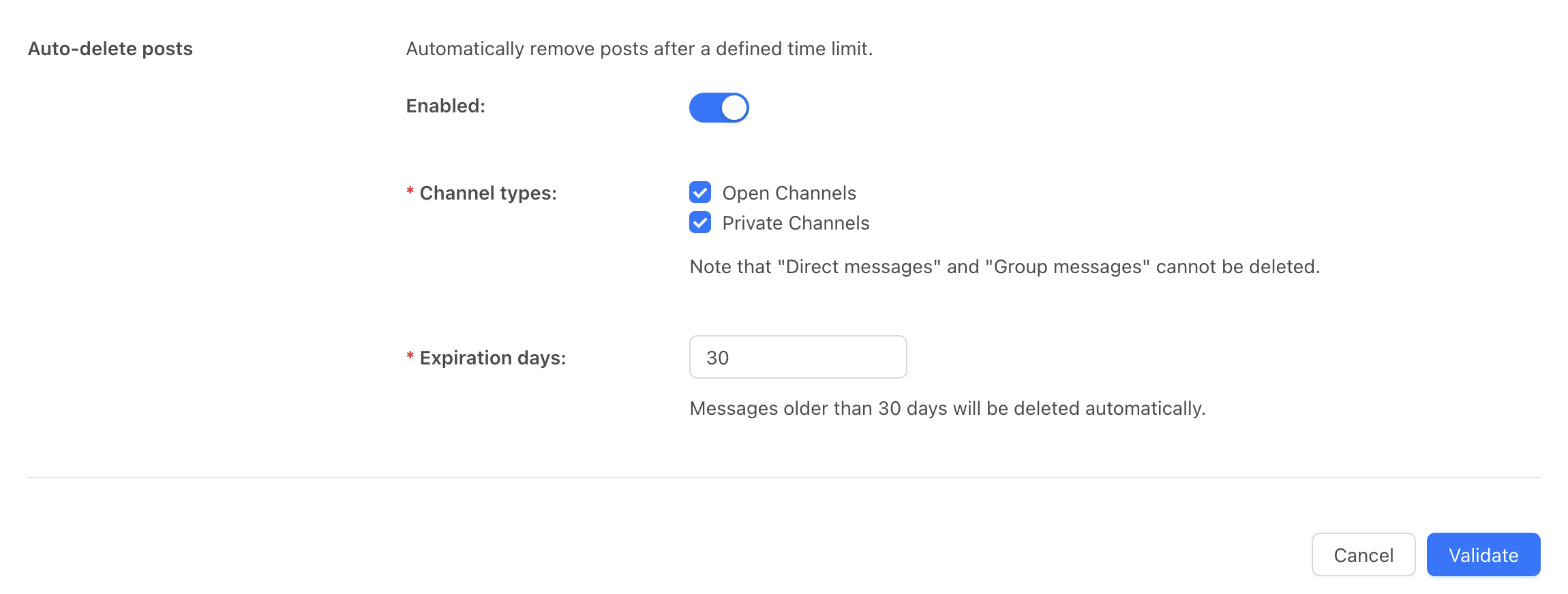 Mattermost messages auto deletion configuration