 Docker: 使用 Traefik 處理自定義域名
本文件是HTTPS 路由指南的一部分。請在此處查看完整指南:如何在 Docker 容器中管理 HTTP 路由和 TLS 加密(HTTPS)。
歡迎來到 Stackhero 文件中心
Stackhero 提供一個即時可用的 Docker 雲端 CaaS(Containers as a Service) 平台,專為快速且可靠的容器部署而設計:
- 只需一行
docker-compose up指令即可部署到生產環境。無需額外設定:直接啟動您的容器即可。- 自行選擇您的網域名稱,系統會自動以 HTTPS 進行安全防護(例如:https://api.your-company.com、https://www.your-company.com 或 https://backoffice.your-company.com)。
- 享有高效能與強大安全性的專屬私有基礎架構。
- 一鍵套用更新,讓維護變得簡單且省時。
您的容器大約五分鐘內即可在生產環境上線。Stackhero 為您管理基礎架構、更新與安全性,讓您能專注於應用程式的交付。深入了解 Docker CaaS 雲端主機服務。
在前面的示例中,我們使用了默認的 <XXXXXX>.stackhero-network.com 域名。實際上,您可能會使用自己的公司或項目域名,例如 www.my-company.com 或 api.my-project.io。以下部分說明如何配置自定義域名。
使用 Traefik 配置您的第一個域名
在此示例中,您將配置域名 api.my-project.io。將 my-project.io 替換為您擁有的域名,並將 api 替換為您想要的子域名。
首先,更新您的域名 DNS 設置,使 api.my-project.io 指向您的 <XXXXXX>.stackhero-network.com 域名。
- 登錄到您的域名提供商並訪問您的 DNS 配置。
- 創建一個名為
api(或您選擇的其他子域名)的新條目,將其類型設置為CNAME,並將其目標設置為<XXXXXX>.stackhero-network.com。
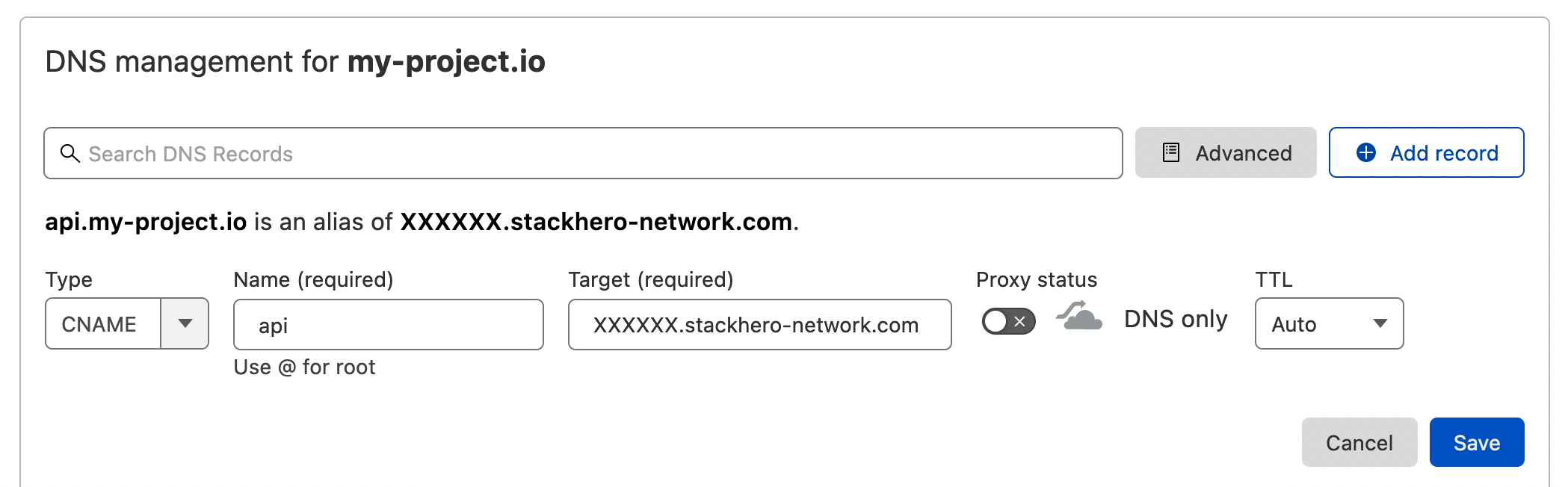 Cloudflare DNS 介面上的 DNS 配置示例
DNS 配置完成後,您可以通過運行以下命令進行驗證:
host api.my-project.io
您應該會看到類似的響應:
api.my-project.io is an alias for <XXXXXX>.stackhero-network.com
DNS 傳播可能需要最多 24 小時,具體取決於您的提供商。 如果
host命令未返回預期的回覆,請稍等片刻再重試。
接下來,使用以下配置更新您的 docker-compose.yml 文件:
services:
  api:
    image: traefik/whoami
    hostname: api
    labels:
      - "traefik.enable=true"
      - "traefik.http.routers.api.rule=Host(`api.my-project.io`)" # 在此處添加您的域名
      - "traefik.http.services.api.loadbalancer.server.port=<PORT>" # 將 "<PORT>" 替換為您的 API 所監聽的端口
      - "traefik.http.routers.api.tls.certresolver=letsencrypt"
請不要忘記在 Traefik 標籤
Host中將api.my-project.io替換為您的實際域名。
使用以下命令部署您的容器:
docker-compose up -d
然後訪問 https://api.my-project.io。您應該會看到一個顯示您的容器主機名 api 的文本頁面。
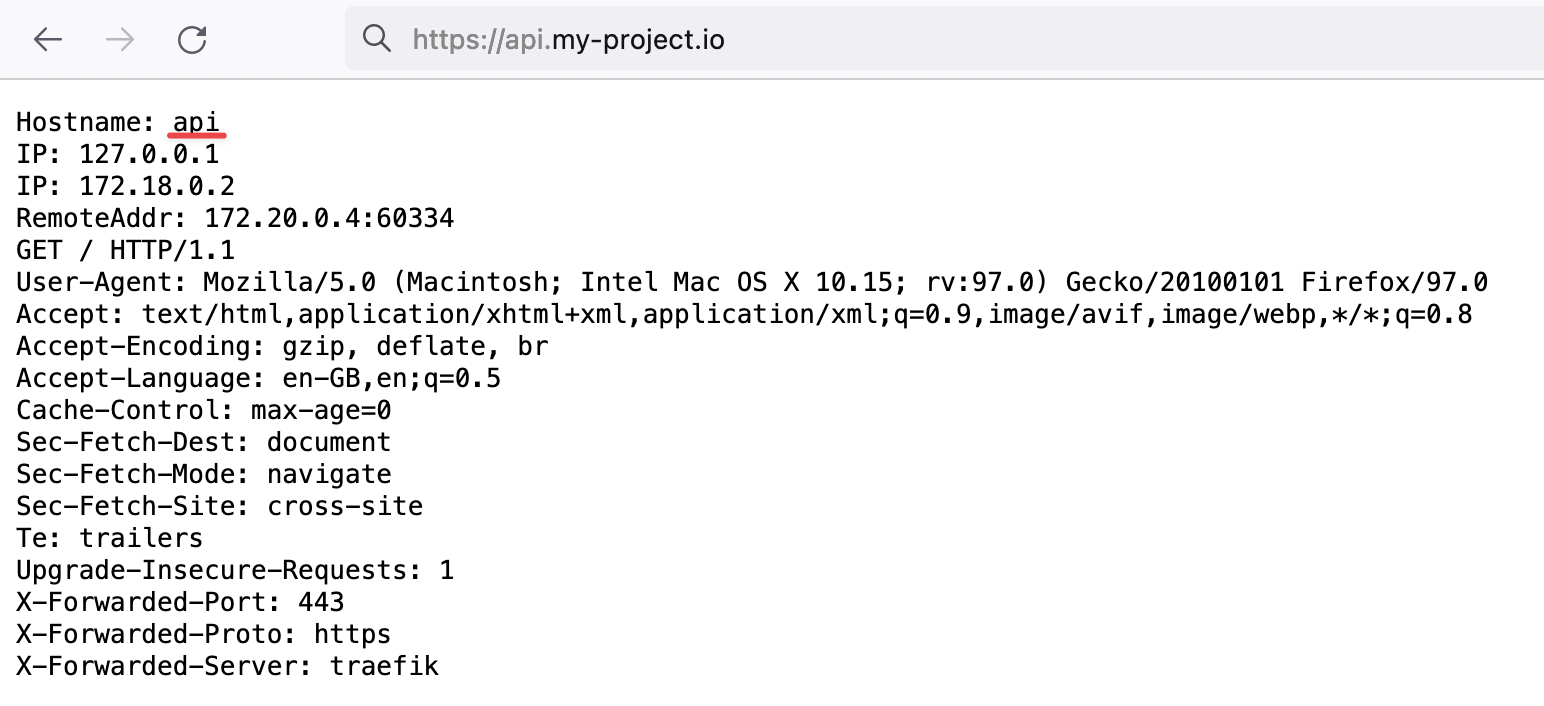 證明 Traefik 正在為我們的新域名處理 HTTP 流量並進行 TLS 加密
在首次創建容器時,TLS 證書可能需要幾秒鐘才能生成。 如果遇到 TLS 錯誤,請稍等幾秒鐘並刷新頁面,以便證書有時間生成。
恭喜,您現在已配置了您的第一個自定義域名!
如何使用 Traefik 將 "www" 子域名重定向到您的根域名
在定義網站 URL(例如 my-company.com)時,最好也設置一個 "www" 子域名。這確保通過 www.my-company.com 連接的用戶被重定向到您的主站點,並有助於避免重複內容問題。
在下面的示例中,my-company.com 和 www.my-company.com 都被處理。訪問 www.my-company.com 的用戶將被重定向到 my-company.com:
services:
  frontend:
    image: traefik/whoami
    hostname: frontend
    labels:
      - "traefik.enable=true"
      - "traefik.http.routers.frontend.rule=Host(`my-company.com`) || Host(`www.my-company.com`)" # 在此處添加兩個域名
      - "traefik.http.services.frontend.loadbalancer.server.port=<PORT>" # 將 "<PORT>" 替換為您的前端所監聽的端口
      - "traefik.http.routers.frontend.tls.certresolver=letsencrypt"

      # 將 'www.my-company.com' 重定向到 'my-company.com':
      - 'traefik.http.routers.frontend.middlewares=redirect-www'
      - "traefik.http.middlewares.redirect-www.redirectregex.regex=^https://www.my-company.com/(.*)"
      - "traefik.http.middlewares.redirect-www.redirectregex.replacement=https://my-company.com/$${1}"
      - "traefik.http.middlewares.redirect-www.redirectregex.permanent=true"
使用 Traefik 將路徑路由到特定容器
假設您有一個專門用於文檔網站的容器。您可能希望將 https://my-company.com/docs 路由到此容器,同時將其他請求(例如 https://my-company.com/)發送到您的前端容器。下面的示例顯示了如何完成此操作:
services:
  documentations:
    image: traefik/whoami
    hostname: documentations
    labels:
      - "traefik.enable=true"
      - "traefik.http.routers.documentations.rule=Host(`my-company.com`) && PathPrefix(`/docs`)" # 在此處定義路徑前綴
      - "traefik.http.services.documentations.loadbalancer.server.port=<PORT>" # 將 "<PORT>" 替換為您的文檔容器所監聽的端口
      - "traefik.http.routers.documentations.tls.certresolver=letsencrypt"

  frontend:
    image: traefik/whoami
    hostname: frontend
    labels:
      - "traefik.enable=true"
      - "traefik.http.routers.frontend.rule=Host(`my-company.com`) || Host(`www.my-company.com`)"
      - "traefik.http.services.frontend.loadbalancer.server.port=<PORT>" # 將 "<PORT>" 替換為您的前端所監聽的端口
      - "traefik.http.routers.frontend.tls.certresolver=letsencrypt"

      # 將 'www.my-company.com' 重定向到 'my-company.com':
      - 'traefik.http.routers.frontend.middlewares=redirect-www'
      - "traefik.http.middlewares.redirect-www.redirectregex.regex=^https://www.my-company.com/(.*)"
      - "traefik.http.middlewares.redirect-www.redirectregex.replacement=https://my-company.com/$${1}"
      - "traefik.http.middlewares.redirect-www.redirectregex.permanent=true"
現在,訪問 https://my-company.com/docs(或任何子路徑,例如 https://my-company.com/docs/something)將顯示來自 documentations 容器的內容。其他路徑,例如 https://my-company.com/help,將由 frontend 容器提供服務。
在 Traefik 中定義自定義容器端口
默認情況下,Traefik 連接到容器的第一個暴露端口。在某些情況下,您可能需要指定特定端口。下面的示例演示如何定義自定義端口:
services:
  frontend:
    image: traefik/whoami
    hostname: frontend
    labels:
      - "traefik.enable=true"
      - "traefik.http.routers.frontend.rule=Host(`my-company.com`)"
      - "traefik.http.routers.frontend.tls.certresolver=letsencrypt"

      # 將 'https://my-company.com' 的流量路由到端口 80 上的 'frontend' 容器
      - "traefik.http.services.frontend.loadbalancer.server.port=80"