 PostgreSQL: Configuring PostgreSQL with Skyvia
This documentation is part of the Getting Started guide. You can view the complete guide here: How to Get Started with PostgreSQL.
👋 Welcome to the Stackhero documentation!
Stackhero offers a fully managed PostgreSQL cloud solution, designed for reliability and performance:
- Unlimited connections and data transfers for effortless scalability.
- PgAdmin web interface included for easy database management.
- Popular extensions included, such as
PostGIS,TimescaleDB, andPgVector.- Simple, one-click updates to keep your database secure and up to date.
- High performance and enhanced security on private, dedicated infrastructure.
Save time and make your life easier: it only takes 5 minutes to try Stackhero's PostgreSQL cloud hosting solution!
Using Skyvia with Stackhero for PostgreSQL is straightforward. Ensure a secure connection by configuring the following settings:
- Set
ProtocoltoSSL - Set
Portto your PostgreSQL port - Force encryption by setting
SSL ModetoRequire - Select an
SSL TLS Protocolof1.2or higher
For additional details on Skyvia configuration, please refer to the Skyvia official documentation.
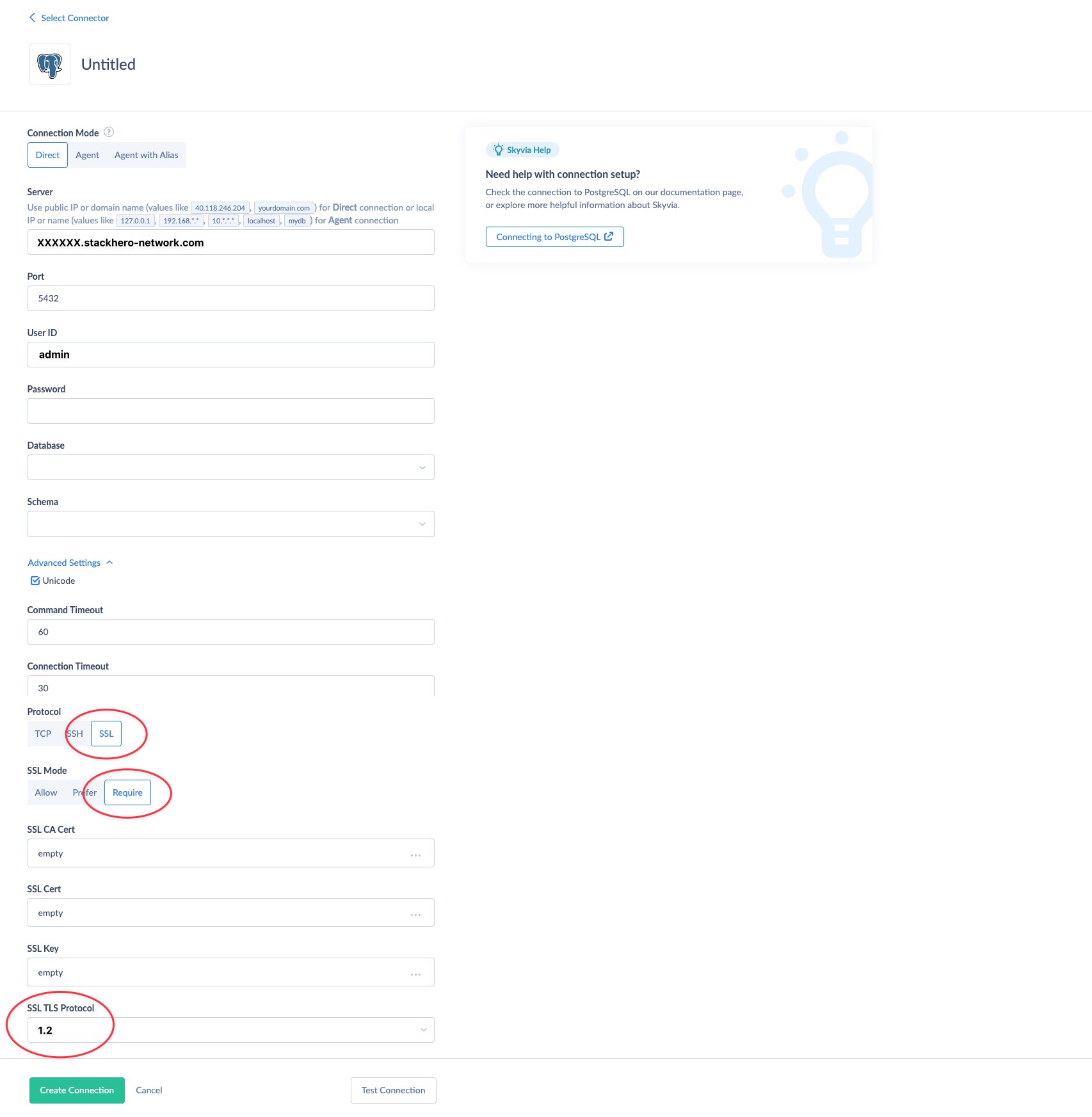 Example of Skyvia configuration with Stackhero for PostgreSQL