 PostgreSQL: Configuring PostgreSQL with Skyvia
This documentation is part of the Getting started guide. View the full guide here: How to get started with PostgreSQL.
👋 Welcome to the Stackhero documentation!
Stackhero provides a fully managed PostgreSQL cloud service, designed for reliability and speed:
- Unlimited connections and data transfers for seamless scaling.
- PgAdmin web UI included for intuitive database management.
- Popular extensions included, such as
PostGIS,TimescaleDB, andPgVector.- Simple, one-click updates keep your database secure and current.
- High performance and strong security on private, dedicated infrastructure.
You can get started with Stackhero's PostgreSQL cloud hosting in just a few minutes. Enjoy a reliable database experience and save valuable time managing your data.
Using Skyvia with Stackhero for PostgreSQL is straightforward. Ensure a secure connection by configuring the following settings:
- Set
ProtocoltoSSL - Set
Portto your PostgreSQL port - Force encryption by setting
SSL ModetoRequire - Select an
SSL TLS Protocolof1.2or higher
For additional details on Skyvia configuration, please refer to the Skyvia official documentation.
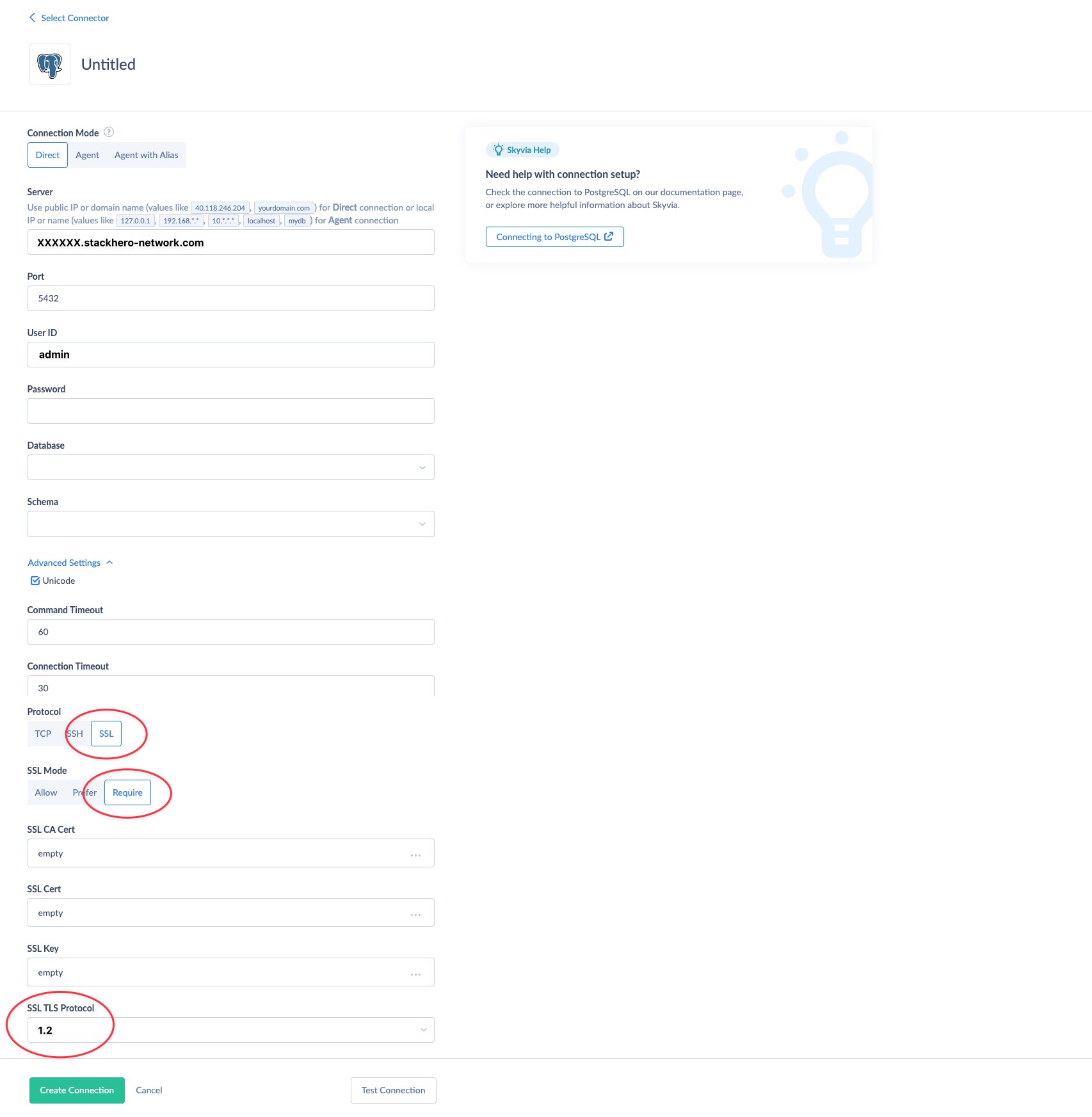 Example of Skyvia configuration with Stackhero for PostgreSQL