 Docker: 使用 Traefik 处理自定义域名
本文档属于HTTPS 路由指南的一部分。您可以在此处查看完整指南:如何在 Docker 容器中管理 HTTP 路由和 TLS 加密(HTTPS)。
欢迎查阅 Stackhero 文档
Stackhero 提供即开即用的 Docker 云端 CaaS(容器即服务) 平台,专为快速、可靠的容器部署而设计:
- 只需一条
docker-compose up命令即可部署到生产环境,无需额外配置:直接启动您的容器。- 可自定义您的域名,并自动通过 HTTPS 实现安全保护(例如:https://api.your-company.com、https://www.your-company.com 或 https://backoffice.your-company.com)。
- 依托专属私有基础设施,享受高性能与强大安全保障。
- 一键应用更新,维护简单高效。
您的容器大约五分钟即可上线生产环境。Stackhero 为您管理基础设施、更新和安全,让您专注于应用交付。详细了解 Docker CaaS 云主机服务。
在前面的示例中,我们使用了默认的 <XXXXXX>.stackhero-network.com 域名。实际上,您可能会使用自己的公司或项目域名,例如 www.my-company.com 或 api.my-project.io。以下部分解释如何配置自定义域名。
使用 Traefik 配置您的第一个域名
在此示例中,您将配置域名 api.my-project.io。将 my-project.io 替换为您拥有的域名,并将 api 替换为您想要的子域名。
首先,更新您的域名 DNS 设置,使 api.my-project.io 指向您的 <XXXXXX>.stackhero-network.com 域名。
- 登录您的域名提供商并访问您的 DNS 配置。
- 创建一个名为
api(或您选择的其他子域名)的新条目,将其类型设置为CNAME,并将其目标设置为<XXXXXX>.stackhero-network.com。
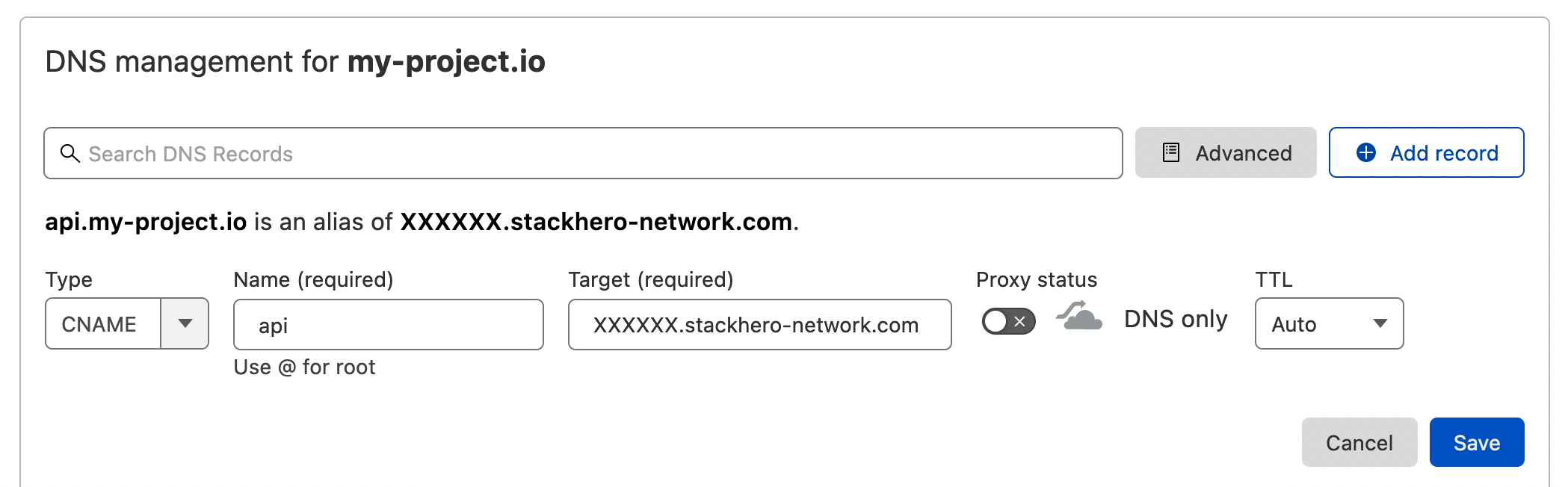 Cloudflare DNS 界面上的 DNS 配置示例
DNS 配置完成后,您可以通过运行以下命令进行验证:
host api.my-project.io
您应该会看到类似的响应:
api.my-project.io is an alias for <XXXXXX>.stackhero-network.com
DNS 传播可能需要长达 24 小时,具体取决于您的提供商。 如果
host命令未返回预期的回复,请稍等片刻再试。
接下来,使用以下配置更新您的 docker-compose.yml 文件:
services:
  api:
    image: traefik/whoami
    hostname: api
    labels:
      - "traefik.enable=true"
      - "traefik.http.routers.api.rule=Host(`api.my-project.io`)" # 在此添加您的域名
      - "traefik.http.services.api.loadbalancer.server.port=<PORT>" # 将 "<PORT>" 替换为您的 API 监听的端口
      - "traefik.http.routers.api.tls.certresolver=letsencrypt"
不要忘记在 Traefik 标签
Host中将api.my-project.io替换为您的实际域名。
使用以下命令部署您的容器:
docker-compose up -d
然后访问 https://api.my-project.io。您应该会看到一个显示您的容器主机名 api 的文本页面。
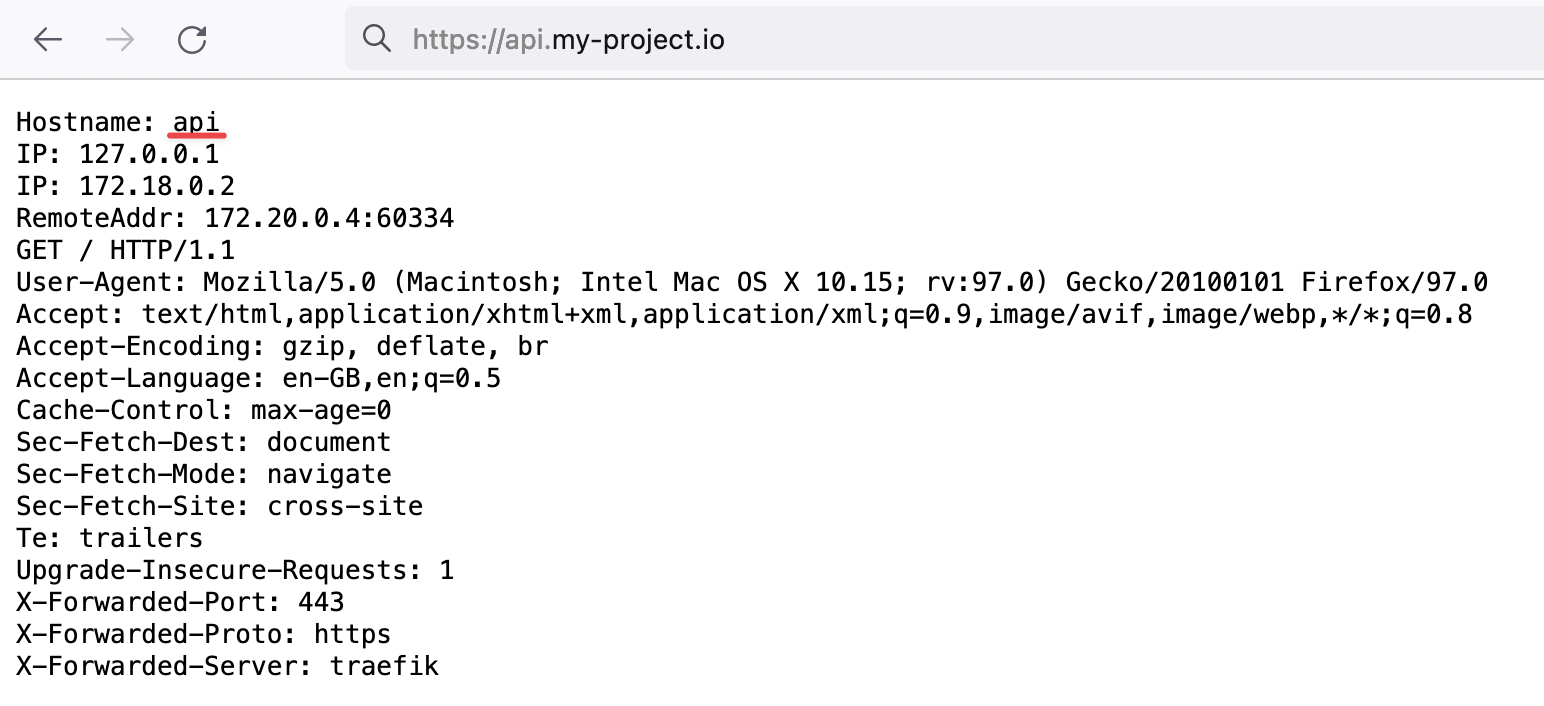 证明 Traefik 正在为我们的新域名处理 HTTP 流量并进行 TLS 加密
在首次创建容器时,TLS 证书可能需要几秒钟才能生成。 如果遇到 TLS 错误,请稍等几秒钟并刷新页面,以便有时间生成证书。
恭喜,您现在已配置了您的第一个自定义域名!
如何使用 Traefik 将 "www" 子域名重定向到您的根域名
在定义网站 URL(如 my-company.com)时,最好也设置一个 "www" 子域名。这可以确保通过 www.my-company.com 连接的用户被重定向到您的主站点,并有助于避免重复内容问题。
在下面的示例中,my-company.com 和 www.my-company.com 都被处理。访问 www.my-company.com 的用户将被重定向到 my-company.com:
services:
  frontend:
    image: traefik/whoami
    hostname: frontend
    labels:
      - "traefik.enable=true"
      - "traefik.http.routers.frontend.rule=Host(`my-company.com`) || Host(`www.my-company.com`)" # 在此添加两个域名
      - "traefik.http.services.frontend.loadbalancer.server.port=<PORT>" # 将 "<PORT>" 替换为您的前端监听的端口
      - "traefik.http.routers.frontend.tls.certresolver=letsencrypt"

      # 将 'www.my-company.com' 重定向到 'my-company.com':
      - 'traefik.http.routers.frontend.middlewares=redirect-www'
      - "traefik.http.middlewares.redirect-www.redirectregex.regex=^https://www.my-company.com/(.*)"
      - "traefik.http.middlewares.redirect-www.redirectregex.replacement=https://my-company.com/$${1}"
      - "traefik.http.middlewares.redirect-www.redirectregex.permanent=true"
使用 Traefik 将路径路由到特定容器
假设您有一个专用于文档站点的容器。您可能希望将 https://my-company.com/docs 路由到此容器,同时将其他请求(如 https://my-company.com/)发送到您的前端容器。下面的示例展示了如何实现这一点:
services:
  documentations:
    image: traefik/whoami
    hostname: documentations
    labels:
      - "traefik.enable=true"
      - "traefik.http.routers.documentations.rule=Host(`my-company.com`) && PathPrefix(`/docs`)" # 在此定义路径前缀
      - "traefik.http.services.documentations.loadbalancer.server.port=<PORT>" # 将 "<PORT>" 替换为您的文档容器监听的端口
      - "traefik.http.routers.documentations.tls.certresolver=letsencrypt"

  frontend:
    image: traefik/whoami
    hostname: frontend
    labels:
      - "traefik.enable=true"
      - "traefik.http.routers.frontend.rule=Host(`my-company.com`) || Host(`www.my-company.com`)"
      - "traefik.http.services.frontend.loadbalancer.server.port=<PORT>" # 将 "<PORT>" 替换为您的前端监听的端口
      - "traefik.http.routers.frontend.tls.certresolver=letsencrypt"

      # 将 'www.my-company.com' 重定向到 'my-company.com':
      - 'traefik.http.routers.frontend.middlewares=redirect-www'
      - "traefik.http.middlewares.redirect-www.redirectregex.regex=^https://www.my-company.com/(.*)"
      - "traefik.http.middlewares.redirect-www.redirectregex.replacement=https://my-company.com/$${1}"
      - "traefik.http.middlewares.redirect-www.redirectregex.permanent=true"
现在,访问 https://my-company.com/docs(或任何子路径,如 https://my-company.com/docs/something)将显示来自 documentations 容器的内容。其他路径,例如 https://my-company.com/help,将由 frontend 容器提供服务。
在 Traefik 中定义自定义容器端口
默认情况下,Traefik 连接到容器的第一个暴露端口。在某些情况下,您可能需要指定特定端口。下面的示例演示如何定义自定义端口:
services:
  frontend:
    image: traefik/whoami
    hostname: frontend
    labels:
      - "traefik.enable=true"
      - "traefik.http.routers.frontend.rule=Host(`my-company.com`)"
      - "traefik.http.routers.frontend.tls.certresolver=letsencrypt"

      # 将 'https://my-company.com' 的流量路由到端口 80 上的 'frontend' 容器
      - "traefik.http.services.frontend.loadbalancer.server.port=80"