 Graylog: Manage retention
How to configure log retention
👋 Welcome to Stackhero documentation
Stackhero offers a fully managed Graylog cloud solution designed for speed and simplicity. You can:
- Rely on an unlimited, dedicated SMTP email server included with your service.
- Apply updates effortlessly with a single click, with no manual intervention required.
- Use a custom domain name secured by HTTPS (for example, https://logs.your-company.com), providing your team with secure, direct access.
- Benefit from strong performance and security on a private, dedicated infrastructure, with no shared resources or noisy neighbours.
Focus on your data, not your tools: you can get started with Stackhero's Graylog cloud hosting solution in just a few minutes.
Retention determines the number of messages stored in the OpenSearch database. You can configure retention based on a message count, a maximum age, or an overall size limit.
For example, you might choose to retain messages from the past 365 days, keep up to 200 million messages, or allocate a total of 400 GB of storage space.
Understanding indices
Before setting your retention policy, it is important to understand how indices used by Graylog and OpenSearch function. Think of indices as physical containers. Graylog "opens" a container (an index) and places incoming messages inside it. When the quota assigned to that container is exceeded, the container is closed, placed on a shelf, and a new container is started for subsequent messages.
You can set this quota using different criteria:
- A number of messages: "Keep 20 million messages per container, then start a new one."
- A time limit: "Use a container for 10 days, then switch to a new one."
- A size limit: "Store 20 GB per container, then move on to a new one."
A maximum number of containers that can be stored on the shelf is also defined. If this number is exceeded, the oldest containers are automatically deleted. For example, if you set a maximum of 20 containers and have 22 on the shelf, the 2 oldest containers will be removed.
In this analogy, the containers represent the indices, the shelf is OpenSearch, and the maximum number represents the permitted number of indices.
Choosing a rotation strategy
Graylog offers three retention strategies:
- "Index time" defines the maximum duration for which messages are kept in each index, for example, 14 days per index.
- "Index message count" sets the maximum number of messages per index, for example, 20 million messages per index.
- "Index size" limits the maximum size of an index, for example, 40 GB per index.
You can select one of these strategies according to your specific requirements. For instance, choosing "Index time" ensures that you always have logs from the past X days.
Be sure to accurately estimate your disk space requirements.
For example, if you store 1 GB of logs per day and decide to keep logs for the past 365 days, you will need 365 GB of disk space. Remember to reserve additional space for system operations as well (see below).
Define the retention parameters
By default, Graylog limits the number of indices to 20. You can adjust this value to suit your needs. For example, if you want to keep logs from the past 365 days, you could distribute retention across indices by dividing 365 days by 20 indices, which results in roughly 19 days per index.
You can perform similar calculations for the other strategies:
- For the "Index message count" strategy: if you want to keep 200 million messages with a maximum of 20 indices, then 200 million messages divided by 20 indices gives 10 million messages per index.
- For the "Index size" strategy: if you want to retain 400 GB of logs with a maximum of 10 indices, then 400 GB divided by 10 indices gives 40 GB per index.
We recommend always keeping at least 15 GB of free disk space for logs, Graylog's journal, and MongoDB data.
If available disk space runs out, OpenSearch will block its operations and you will need to upgrade to a larger instance.
Configure the retention policy
To configure the retention policy, go to the Graylog interface. Under the "System" menu, select "Indices" and click the "Edit" button in the "Default index set" section.
In the example below, the configuration sets a maximum of 27 indices, with each index retaining 14 days of logs. This setup retains logs for approximately a year (378 days).
We do not recommend keeping more than 14 days of messages per index.
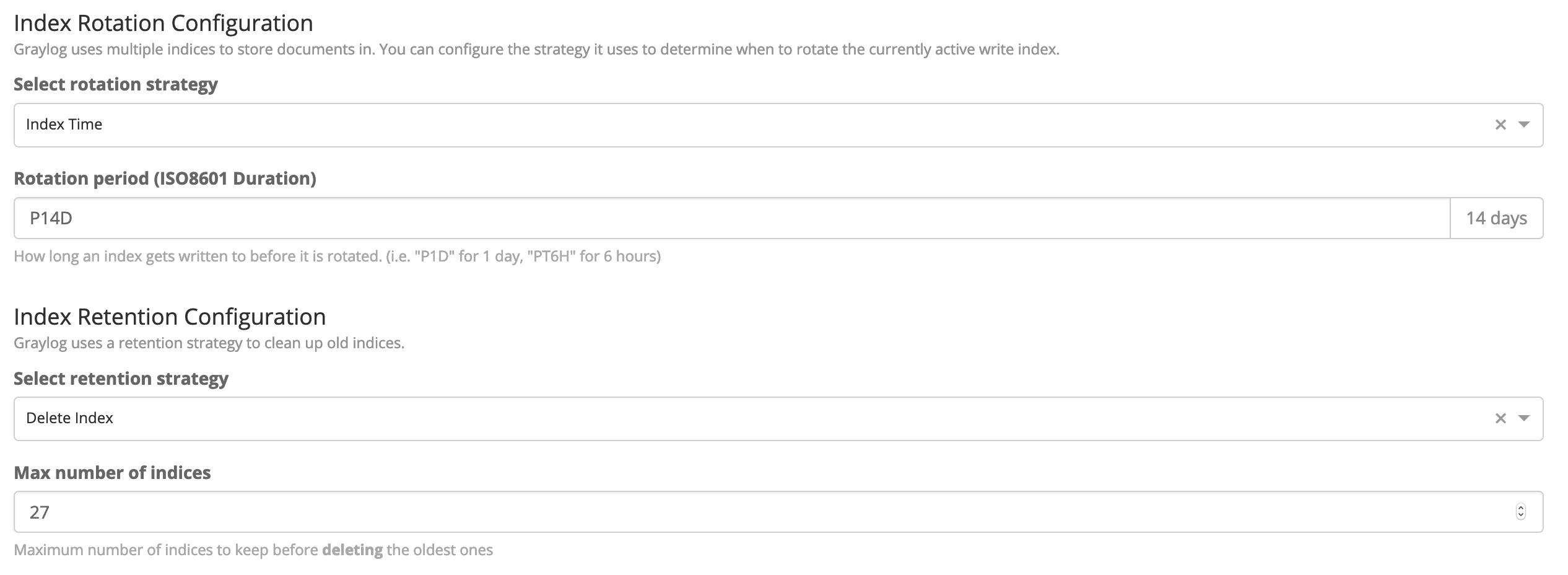 Retention configuration to keep logs for a year
When choosing "Index time" as a rotation policy, you must define the duration using the ISO8601 Duration standard.
For example, "P7D" means 7 days, "P14D" means 14 days, and so on.
Further reading
If you would like to learn more about indices, we strongly encourage you to consult the official documentation.
Handling errors related to OpenSearch read-only indices
Occasionally, OpenSearch may switch to read-only mode and you might encounter errors such as:
- "Flood stage disk watermark exceeded, all indices on this node will be marked read-only"
- "FORBIDDEN/12/index read-only / allow delete (api)"
These errors occur as part of OpenSearch's protection mechanism when disk space becomes critically low. When available disk space drops below 7 GB, OpenSearch sets indices to read-only as a precaution to prevent data corruption.
If you encounter these errors, you have two options:
- Reconfigure your retention policy to keep fewer logs. After adjusting the policy, delete the oldest index to free up disk space and allow OpenSearch to return to read-write mode. Please note that deleting an index will permanently remove all data it contains.
- Upgrade to an instance with a larger disk. With a single click from your Stackhero dashboard, the instance will restart with more disk space and OpenSearch will automatically return to read-write mode.