 Node-RED: Simple example: using Node-RED with the MQTT server
This documentation is part of the MQTT server guide. You can view the complete guide here: How to connect Node-RED to the Mosquitto MQTT server.
Welcome to the Stackhero documentation
Stackhero offers a fully managed Node-RED cloud environment designed to help you build workflows quickly:
- Integrated MQTT server (Mosquitto) for seamless IoT integration.
- Full access to the Node-RED admin interface for managing your flows and settings.
- Node-RED Dashboard included for real-time visualisation.
- Dedicated SMTP email server included, with no sending limits.
- Effortless one-click updates to keep your instance up to date.
- Custom domain names with automatic HTTPS: for example, https://node-red.your-company.com.
- High performance and enhanced security thanks to private, dedicated infrastructure.
You can have a secure, production-ready Node-RED cloud hosting instance running in around 5 minutes. Stackhero takes care of installation, updates, and infrastructure, so you can focus on building your automations.
If you are new to using MQTT with Node-RED, here is a simple example to help you get started quickly. This example demonstrates how to send a message to a topic and receive messages from it. You can download the flow example and import it into your Node-RED instance using the "Import" menu.
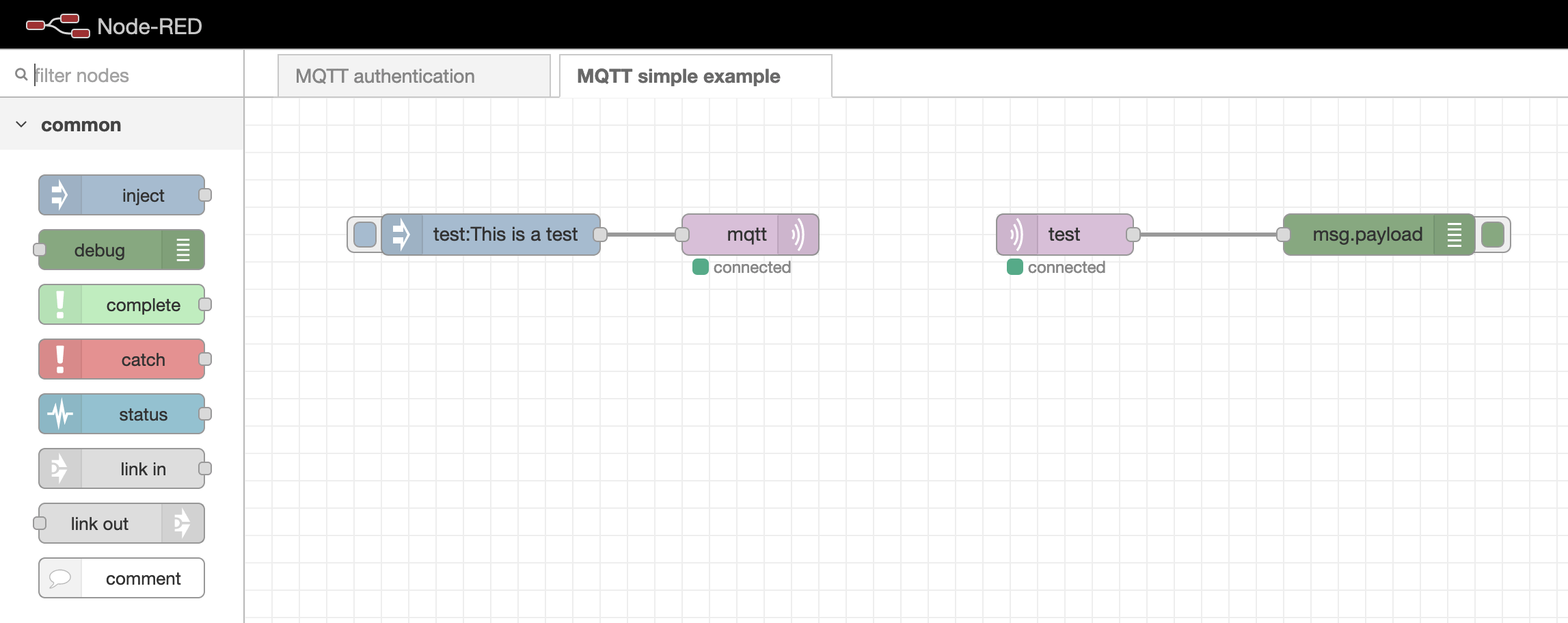 Simple example of connecting MQTT to Node-RED
If your MQTT nodes are stuck in the "connecting" state, it is advisable to check whether the
MQTT authenticationflow is still present. If it is missing, you can download it here: mqttAuthenticationFlow.json. Import this flow into your Node-RED instance, update theUsersnode with your chosen passwords, and remove any unnecessary comments as needed.