 Node.js: Managing secrets
How to manage secrets with Node.js
👋 Welcome to the Stackhero documentation!
Stackhero provides a ready-to-use Node.js cloud solution designed to help you move faster:
- Deploy your application to production in seconds with a simple
git push. No additional tools or manual configuration required.- Use your own domain and benefit from automatic HTTPS certificate setup, ensuring your application is secure without any extra steps.
- Enjoy automatic backups, one-click updates, and clear, predictable pricing so you can focus on developing features while Stackhero manages the infrastructure.
- Experience optimal performance and enhanced security thanks to a private, dedicated VM.
Save time and simplify your operations: it only takes a few minutes to try out Stackhero's Node.js cloud hosting solution!
When your Node.js project interacts with a database, object storage, or an external API, it is essential to store credentials—such as usernames, passwords, or tokens—securely. These credentials are commonly referred to as "secrets". Protecting your secrets is crucial for ensuring the security of your application.
What you might be tempted to do
Initially, you might consider writing your credentials directly in your code, like this:
// Connecting to a PostgreSQL database
const pg = new Client({
  host: '<XXXXXX>.stackhero-network.com',
  user: 'admin',
  password: 'myPassword',
  database: 'admin'
});
However, this method is not secure. Your secrets could end up in your Git repository, making them accessible to anyone with access to the code. Even if you believe you are the only one with access, it is a bit like leaving a Post-it note with your passwords on your monitor and hoping nobody notices. This can eventually lead to serious security issues.
Moreover, hard-coding your secrets makes it more difficult to manage different environments, such as development and production.
Environment variables
A widely adopted best practice in the industry is to store secrets in environment variables.
Environment variables are defined outside your code and are set before Node.js starts. The idea is to define all your secrets via environment variables, so they are never hard-coded in your application.
Defining your first environment variables
You can define an environment variable by passing it at the start of your Node.js command, like this:
MY_PASSWORD=myDevelopmentPassword node app.js
This command creates a variable called MY_PASSWORD with the value myDevelopmentPassword. The format is straightforward: <KEY>=<value>.
By convention, environment variables are written in uppercase letters. Note that environment variables can only contain strings, not arrays or objects.
Reading environment variables
In your app.js file, you can access your environment variable via process.env, like so:
console.log(process.env.MY_PASSWORD);
This will display myDevelopmentPassword.
Your password is now defined outside your code. This helps prevent it from inadvertently ending up in your Git repository.
If you are using Stackhero in production, you can define a new environment variable named MY_PASSWORD with the value myProductionPassword directly from your Node.js service dashboard. This makes it easy to manage different environments smoothly.
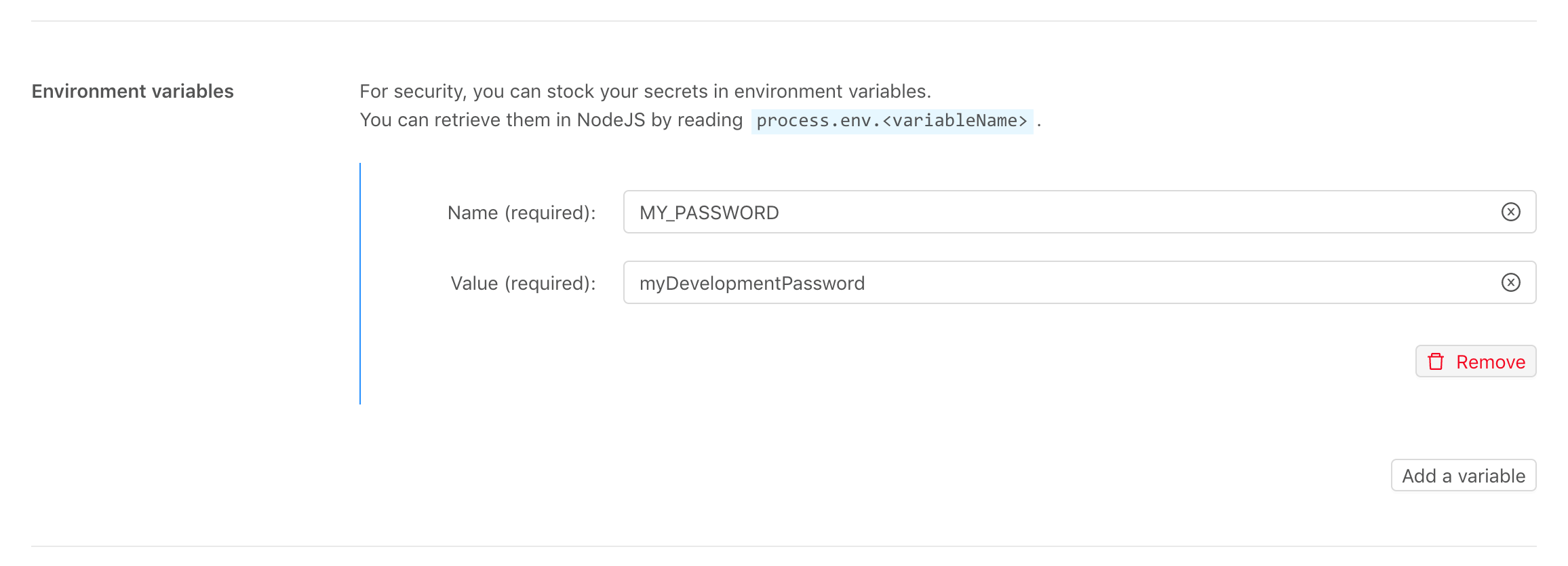 Example of Node.js configuration on the Stackhero dashboard
With this approach, your password is no longer stored in your code, and you can easily use different credentials for development and production environments.
Using the dotenv library
In real-world projects, it is common to need to manage several secrets. For example, connecting to a database often requires a hostname, username, and password.
Managing a single secret is simple, but juggling several quickly becomes cumbersome. Imagine starting your application with a command like this:
POSTGRESQL_HOST=<XXXXXX>.stackhero-network.com POSTGRESQL_USER=admin POSTGRESQL_PASSWORD=myPassword node app.js
This soon becomes difficult to read and maintain. In production, you will likely have even more variables, making this approach impractical.
This is where the dotenv library comes in.
With dotenv, you can store your secrets in a separate file called .env.
To get started, install the dotenv library by running:
npm install dotenv
Next, create a .env file to store your variables:
POSTGRESQL_HOST=<XXXXXX>.stackhero-network.com
POSTGRESQL_USER=admin
POSTGRESQL_PASSWORD=myPassword
To keep your secrets secure, ensure your .env file is not added to your Git repository. You can do this by adding it to your .gitignore file:
echo ".env" >> .gitignore
Finally, load the dotenv library at the top of your app.js file:
require("dotenv").config();
With this setup, when you start your application using node app.js, dotenv automatically reads your .env file on your development machine. In production, you do not need the .env file. Environment variables are retrieved directly from your Node.js service configuration, which you can manage via the Stackhero dashboard.
Working example
Now that we have covered the theory, let us look at a practical example.
You can find a complete, working example here: https://github.com/stackhero-io/dotenvWithNodejs
With these techniques, you can manage your secrets in a flexible and secure manner, while keeping the process simple and efficient.