 Graylog: Configure the retention policy
This documentation is part of the Manage retention guide. You can view the complete guide here: How to configure log retention.
👋 Welcome to Stackhero documentation
Stackhero offers a fully managed Graylog cloud solution designed for speed and simplicity. You can:
- Rely on an unlimited, dedicated SMTP email server included with your service.
- Apply updates effortlessly with a single click, with no manual intervention required.
- Use a custom domain name secured by HTTPS (for example, https://logs.your-company.com), providing your team with secure, direct access.
- Benefit from strong performance and security on a private, dedicated infrastructure, with no shared resources or noisy neighbours.
Focus on your data, not your tools: you can get started with Stackhero's Graylog cloud hosting solution in just a few minutes.
To configure the retention policy, go to the Graylog interface. Under the "System" menu, select "Indices" and click the "Edit" button in the "Default index set" section.
In the example below, the configuration sets a maximum of 27 indices, with each index retaining 14 days of logs. This setup retains logs for approximately a year (378 days).
We do not recommend keeping more than 14 days of messages per index.
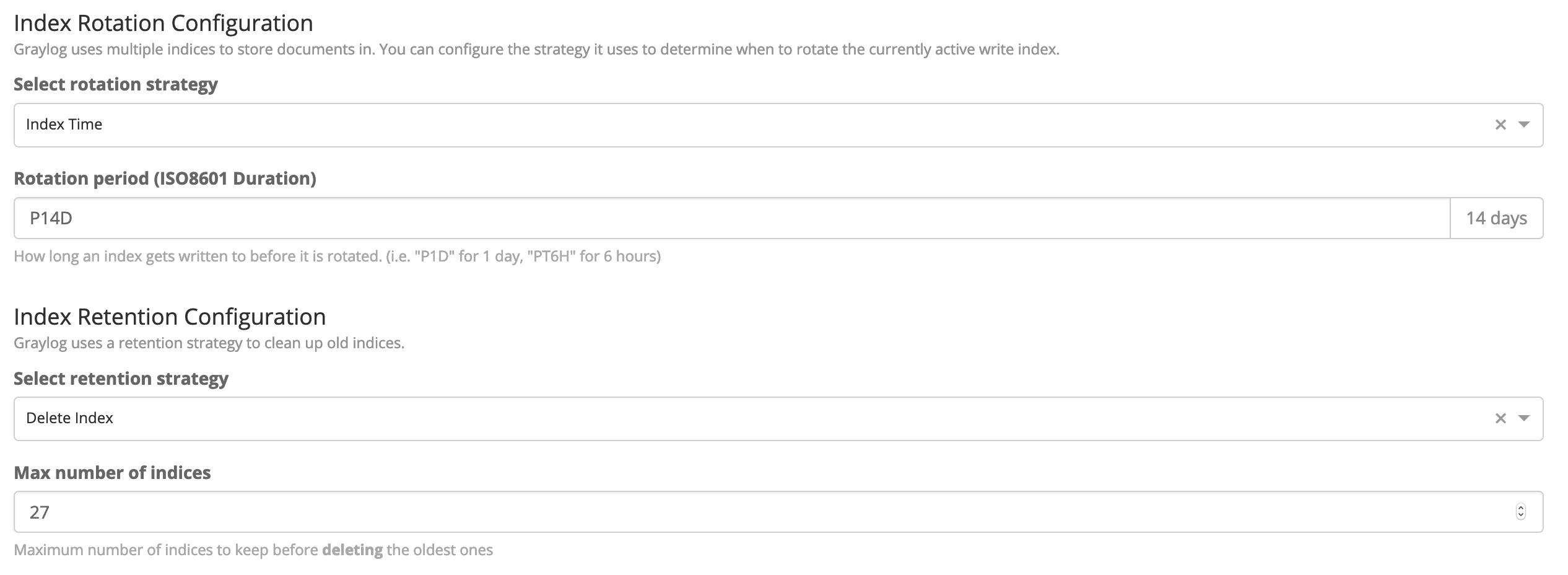 Retention configuration to keep logs for a year
When choosing "Index time" as a rotation policy, you must define the duration using the ISO8601 Duration standard.
For example, "P7D" means 7 days, "P14D" means 14 days, and so on.