 Graylog: Configuring email notifications
This documentation is part of the Alerting guide. You can view the complete guide here: How to send Graylog alerts by email, Slack, or Mattermost.
👋 Welcome to Stackhero documentation
Stackhero offers a fully managed Graylog cloud solution designed for speed and simplicity. You can:
- Rely on an unlimited, dedicated SMTP email server included with your service.
- Apply updates effortlessly with a single click, with no manual intervention required.
- Use a custom domain name secured by HTTPS (for example, https://logs.your-company.com), providing your team with secure, direct access.
- Benefit from strong performance and security on a private, dedicated infrastructure, with no shared resources or noisy neighbours.
Focus on your data, not your tools: you can get started with Stackhero's Graylog cloud hosting solution in just a few minutes.
Every Graylog instance provided by Stackhero comes with an integrated email server, allowing you to send unlimited emails directly from your instance at no extra cost.
To configure an email notification, you may wish to follow these steps:
-
Access your Graylog service, go to
Alerts>Notifications, and click theGet started!button or selectCreate notification. -
Enter a title for your notification and select
Email NotificationunderNotification type. -
In the
Senderfield, enternoreply@<yourGraylogDomain>. Be sure to replace<yourGraylogDomain>with your actual Graylog domain name, which is typically in the format<XXXXXX>.stackhero-network.com.Important: Make sure you use your Graylog domain to avoid errors when sending emails.
-
Specify the email address where you wish to receive alerts in the
Email recipientfield.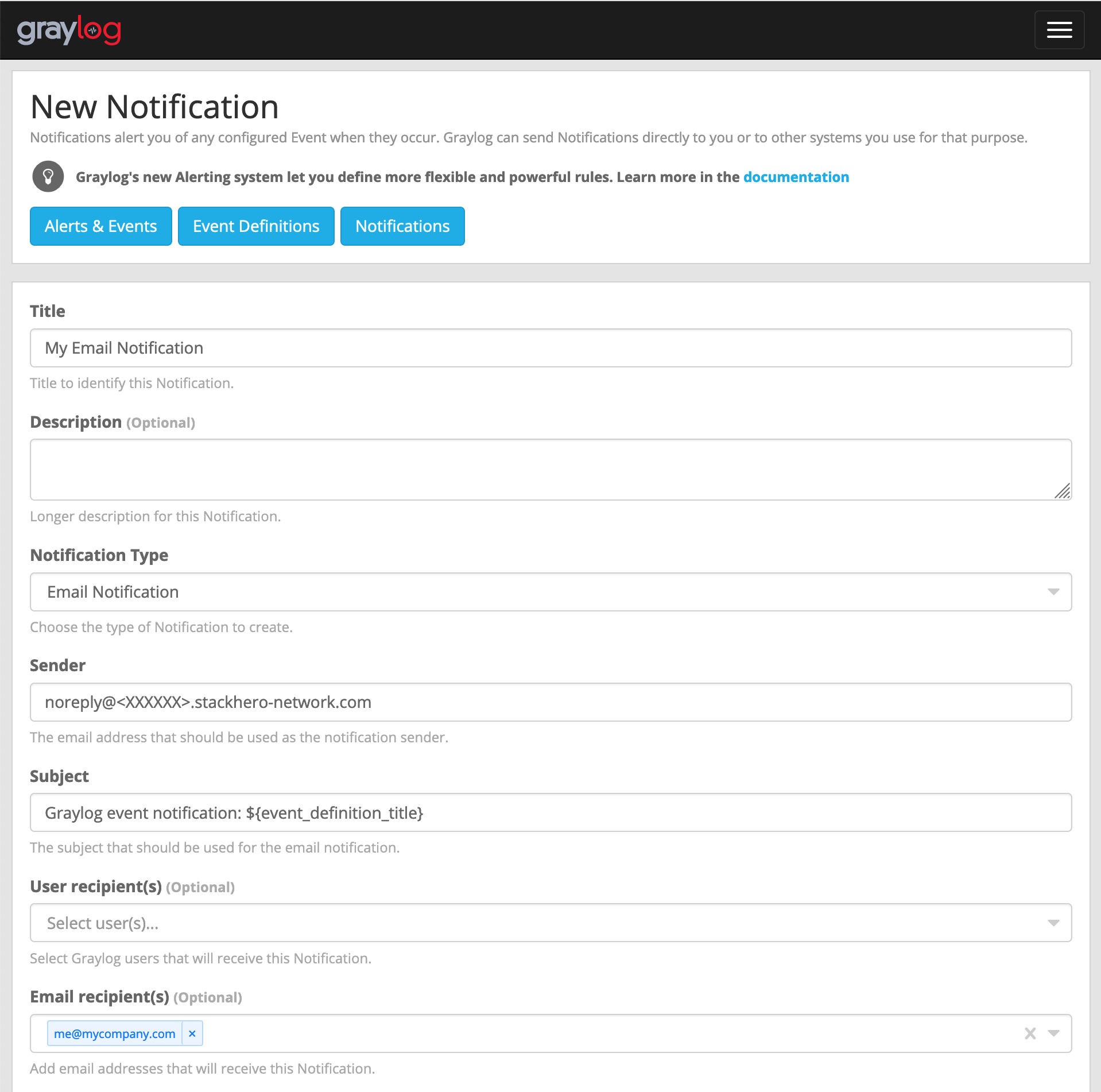 Example of email configuration
 -
Click the
Execute test notificationbutton to check that everything is working correctly. Once confirmed, complete the setup by clickingCreate.
Congratulations! Your email notification is now configured and operational!
Handling the error: "Sending the email to the following server failed: postfix:25"
If you encounter the error Error: Notification has email recipients and is triggered, but sending emails failed. Sending the email to the following server failed: postfix:25, it is most likely because the sender field is not correctly formatted. It should follow the pattern <something>@<yourGraylogDomain>. "Something" can be any value (such as "noreply"), but "yourGraylogDomain" must match your Graylog service domain, usually presented as <XXXXXX>.stackhero-network.com.