 Node-RED: Receiving button pushes and sending emails
This documentation is part of the Use case: connect mailboxes guide. You can view the complete guide here: Seamlessly connect hundreds of mailboxes in a post office.
Welcome to the Stackhero documentation
Stackhero offers a fully managed Node-RED cloud environment designed to help you build workflows quickly:
- Integrated MQTT server (Mosquitto) for seamless IoT integration.
- Full access to the Node-RED admin interface for managing your flows and settings.
- Node-RED Dashboard included for real-time visualisation.
- Dedicated SMTP email server included, with no sending limits.
- Effortless one-click updates to keep your instance up to date.
- Custom domain names with automatic HTTPS: for example, https://node-red.your-company.com.
- High performance and enhanced security thanks to private, dedicated infrastructure.
You can have a secure, production-ready Node-RED cloud hosting instance running in around 5 minutes. Stackhero takes care of installation, updates, and infrastructure, so you can focus on building your automations.
To manage the button actions and dispatch notifications to users, Node-RED was chosen for data processing, with a MongoDB database to store user emails.
Node-RED is a graphical programming tool developed by IBM, ideal for this kind of task. It is easy to use, powerful, and highly extensible.
Thanks to Node-RED, our customer was able to create their entire backend in just a few hours!
When a mailbox button is pressed, the message is received by Node-RED via MQTT. Node-RED then locates the corresponding user in the MongoDB database, composes a new email, and sends it.
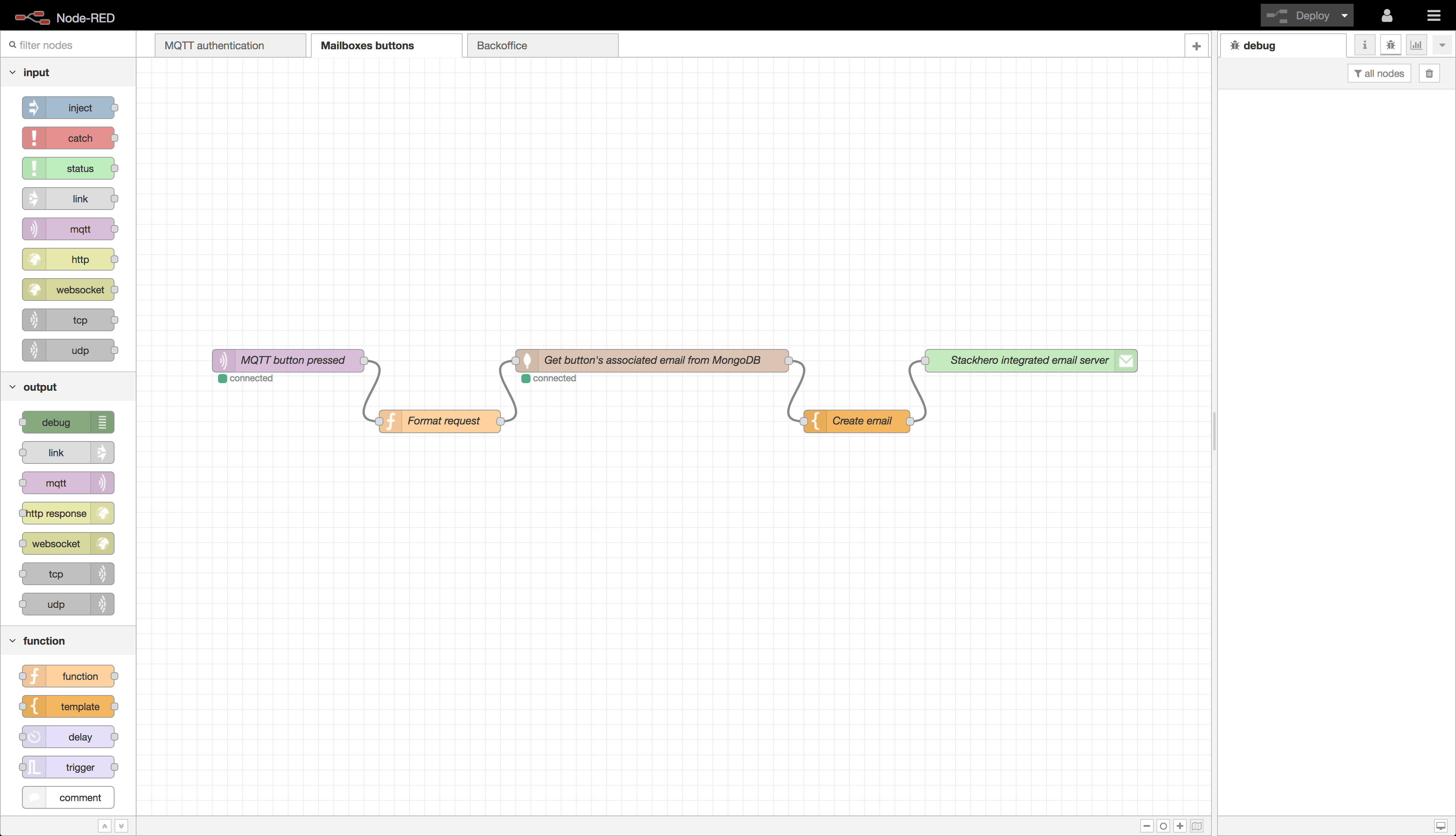 Node-RED flow: only 5 nodes are required to create the entire backend!
When you start a Node-RED instance on Stackhero, you get an MQTT server along with a dedicated email server, enabling you to send unlimited emails!