 Node-RED: What are Node-RED nodes
This documentation is part of the Introduction guide. View the full guide here: Introduction to Node-RED, all you need to know about it.
Welcome to the Stackhero documentation
Stackhero provides a fully managed Node-RED cloud environment designed to get you building workflows quickly:
- Built-in MQTT server (Mosquitto) for seamless IoT integration.
- Full access to the Node-RED admin UI for managing flows and settings.
- Node-RED Dashboard included for real-time visualization.
- Dedicated SMTP email server included, with no limits on sending.
- Effortless one-click updates to keep your instance current.
- Custom domain names with automatic HTTPS: for example, https://node-red.your-company.com.
- High performance and strong security with private, dedicated infrastructure.
You can have a secure, production-ready Node-RED cloud hosting instance running in about 5 minutes. Stackhero handles setup, updates, and infrastructure so you can focus on building automations.
In Node-RED, a "node" refers to a block that can receive, transform, and transmit data.
This data can flow between nodes, external APIs (such as Google, Stripe, Twitter, etc.), databases (like MySQL, MongoDB, Elasticsearch, OpenSearch, etc.), or other systems (including MQTT, email servers, object storage, and more).
Nodes are interconnected using wires, visually arranged within the browser interface.
Node-RED includes approximately 40 pre-installed nodes. Some are basic, like Switch conditions. Others facilitate external connections, like HTTP, MQTT, or Email nodes. Some nodes, such as Function and Template, can encompass complex code or be used to craft advanced text documents or HTML pages.
With the Node-RED "palette," you have the option to add external nodes crafted by global companies or users. Nearly 4,000 external nodes are available, all free of charge!
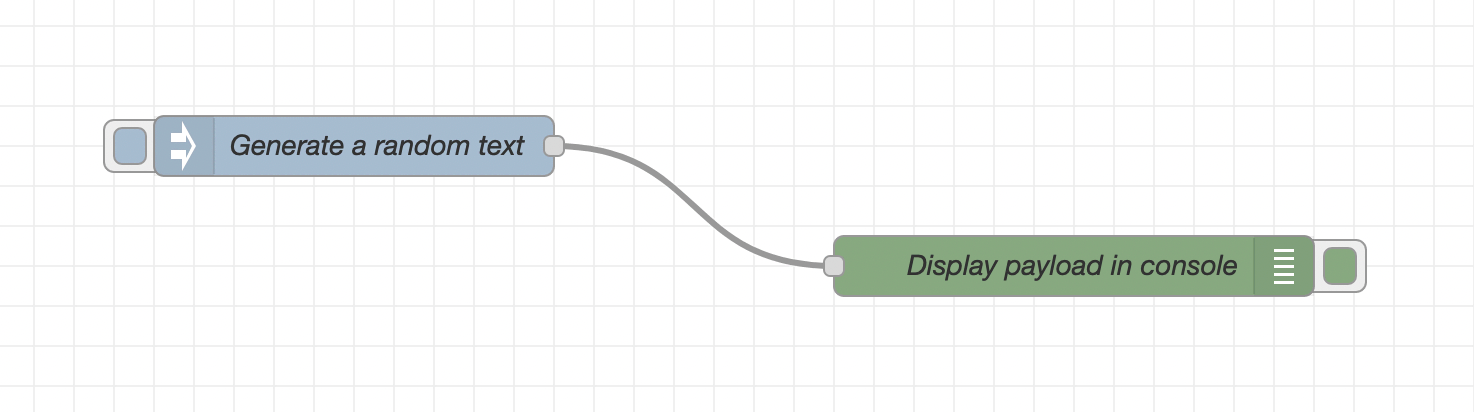 Node-RED nodes example