 Node-RED: Store data on the filesystem
This documentation is part of the Getting started guide. View the full guide here: How to get started with Node-RED.
Welcome to the Stackhero documentation
Stackhero provides a fully managed Node-RED cloud environment designed to get you building workflows quickly:
- Built-in MQTT server (Mosquitto) for seamless IoT integration.
- Full access to the Node-RED admin UI for managing flows and settings.
- Node-RED Dashboard included for real-time visualization.
- Dedicated SMTP email server included, with no limits on sending.
- Effortless one-click updates to keep your instance current.
- Custom domain names with automatic HTTPS: for example, https://node-red.your-company.com.
- High performance and strong security with private, dedicated infrastructure.
You can have a secure, production-ready Node-RED cloud hosting instance running in about 5 minutes. Stackhero handles setup, updates, and infrastructure so you can focus on building automations.
Stackhero for Node-RED offers local storage where your nodes can store files. This storage is located in the /persistent/storage/ directory.
Never use another destination for your local storage than a subdirectory of
/persistent/storage/. If you use another directory, you will lose your data when you apply a Node-RED update!
Node configuration to store local data
In this example, we will use the node-red-node-sqlite node. This node requires a directory to store its data.
You will need to define a file in the directory /persistent/storage/, for example, /persistent/storage/myDatabase.sqlite.
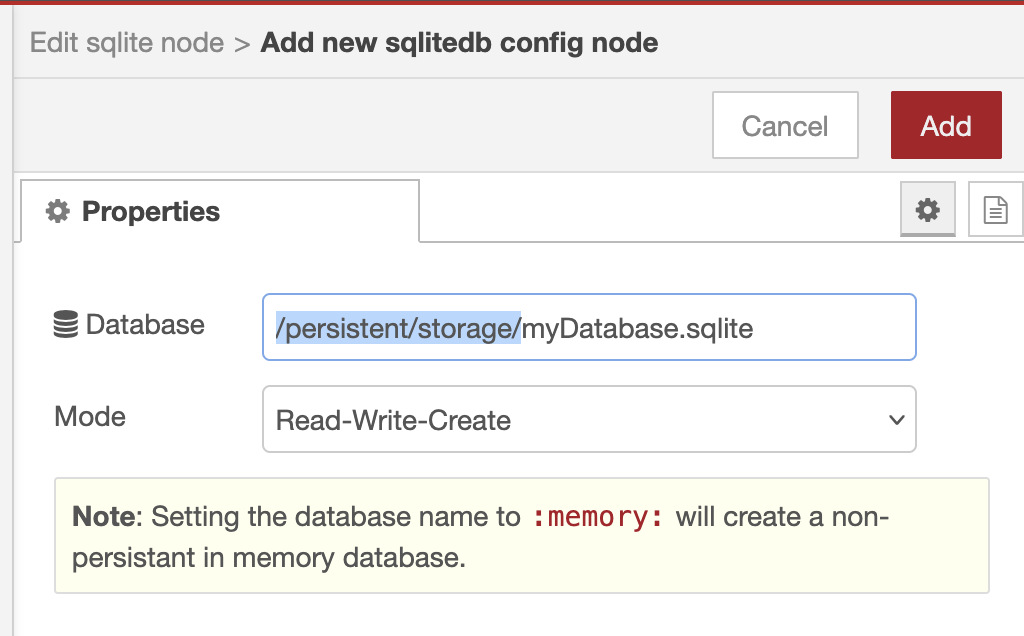 Example of SQLite configuration on Node-RED
Store files
If you need to store data locally, you can write files to the /persistent/storage/ directory. Some Node-RED data might already be present in this directory. To avoid conflicts, it is recommended to use subdirectories, for example, /persistent/storage/myFlowData, to store your files.
To create this directory using Node.js, run the following code in your node:
fs.mkdirSync('/persistent/storage/myFlowData', { recursive: true });
notice If you plan to store more than a few files, we recommend using an object storage server. Object storage servers make it easier to manage, share, and access files via an API, like with the S3 protocol. Consider the MinIO service available on Stackhero for this purpose, which gives you an S3 compatible object storage server in just 2 minutes.