 Node-RED: Use an HTTP node with an iFrame
This documentation is part of the Getting started guide. View the full guide here: How to get started with Node-RED.
Welcome to the Stackhero documentation
Stackhero provides a fully managed Node-RED cloud environment designed to get you building workflows quickly:
- Built-in MQTT server (Mosquitto) for seamless IoT integration.
- Full access to the Node-RED admin UI for managing flows and settings.
- Node-RED Dashboard included for real-time visualization.
- Dedicated SMTP email server included, with no limits on sending.
- Effortless one-click updates to keep your instance current.
- Custom domain names with automatic HTTPS: for example, https://node-red.your-company.com.
- High performance and strong security with private, dedicated infrastructure.
You can have a secure, production-ready Node-RED cloud hosting instance running in about 5 minutes. Stackhero handles setup, updates, and infrastructure so you can focus on building automations.
When using an iFrame to request content via an HTTP node, the default header X-Frame-Options: SAMEORIGIN might prevent the page from displaying. Starting with Node-RED version 1.2.2-0, you can override this default header.
To do so, set the header X-Frame-Options to null on your HTTP response node. For example:
msg.headers = { "X-Frame-Options": null };
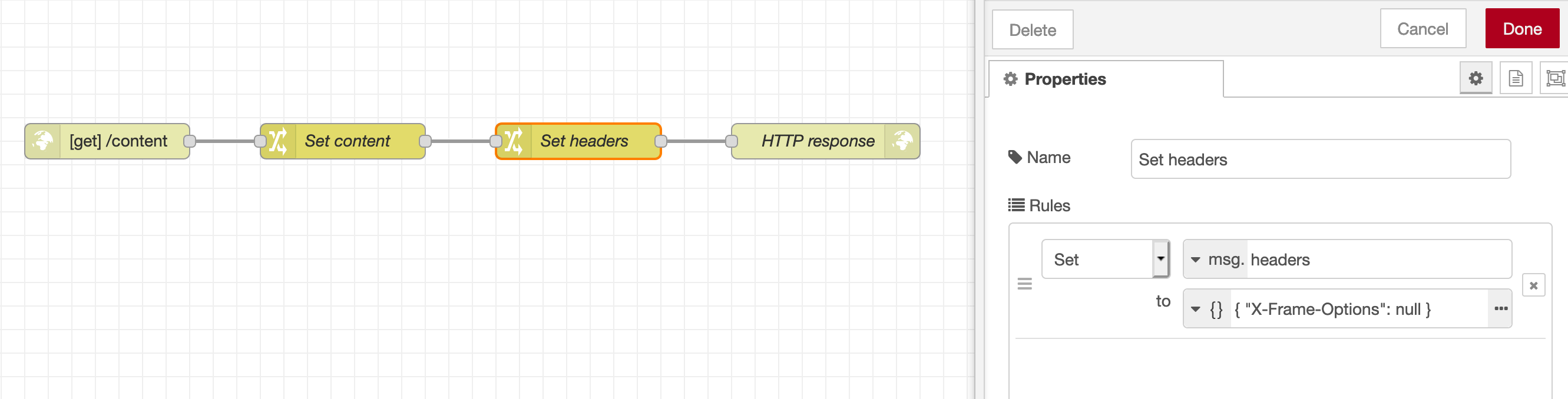 Example of a node setting the header X-Frame-Options
You can download this flow example and import it into your Node-RED instance to test the feature.
Note that you can also restrict allowed domains using the headers Content-Security-Policy: frame-ancestors <source> or X-Frame-Options: ALLOW-FROM <source>.